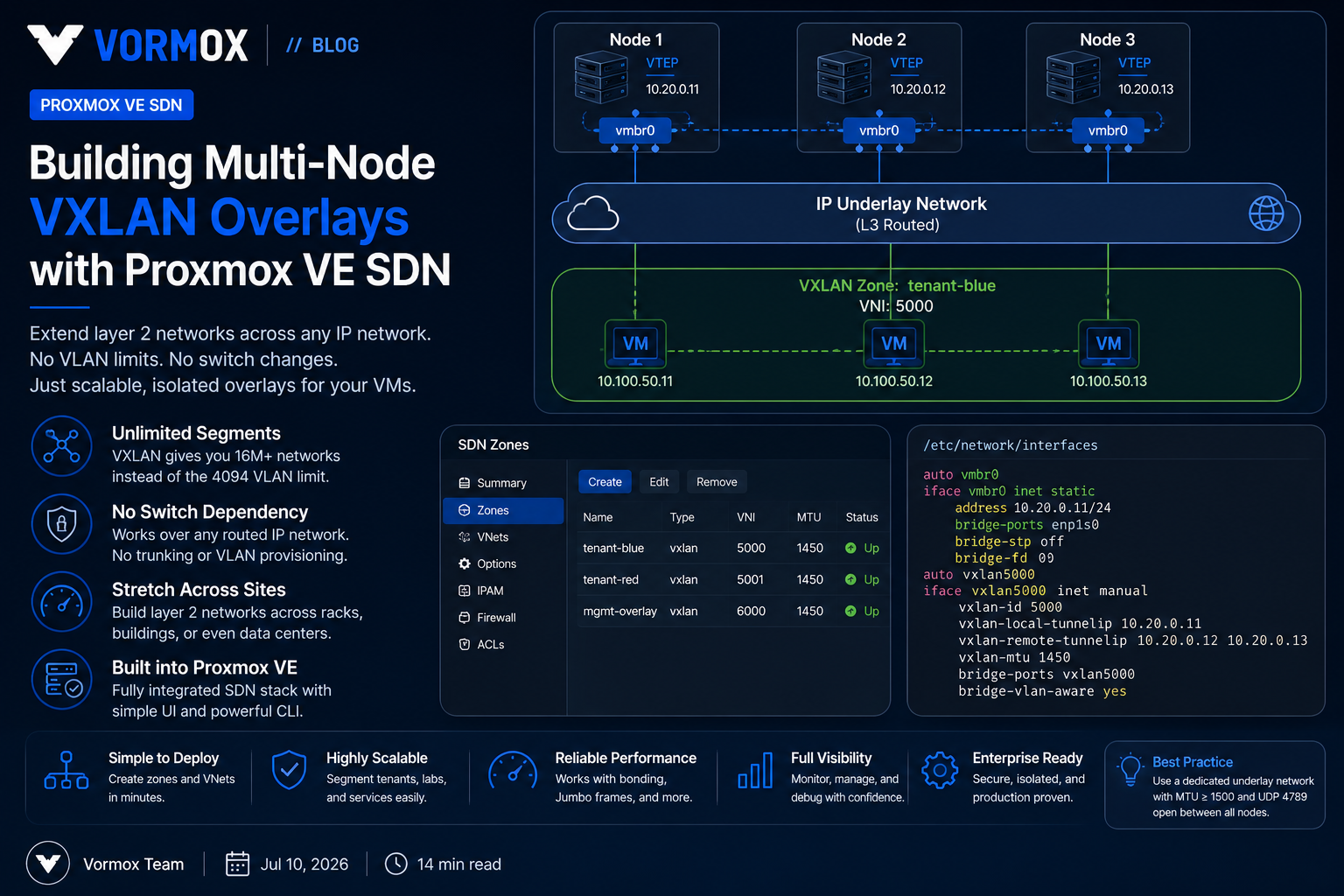
Stretch a VLAN across three racks and two switch vendors long enough and you'll eventually get paged for it. Somebody adds a new uplink, forgets to trunk the tag, and half your VMs on that network go dark until someone notices the MAC table on the core switch never updated. Proxmox VE's SDN stack gives you a way out of that particular trap: VXLAN zones let you build layer 2 networks that live entirely inside the hypervisor layer, tunneled over whatever routed IP network already connects your nodes. No switch-side VLAN provisioning, no dependency on spanning tree behaving itself, and no waiting on a change ticket to the network team every time a tenant needs a new segment.
This isn't a new feature — VXLAN zones have been part of Proxmox VE SDN since the 6.2 era and have matured steadily through the 7.x and 8.x release lines. What's changed is how usable it's gotten. In PVE 8.x the SDN stack ships enabled by default, ifupdown2 is the standard networking backend, and the previously-optional libpve-network-perl package is no longer something you have to think about. If you've been avoiding SDN because it felt half-baked in earlier releases, it's worth another look.
Problem Overview
Classic 802.1Q VLANs top out at 4094 usable tags, and in practice you rarely get to use all of them — network teams carve out ranges, reserve blocks for other departments, and by the time you ask for twenty new tags for a multi-tenant lab environment you're negotiating. Every VLAN you add also has to be trunked, consistently, on every physical uplink a VM on that network might traverse: every node's NIC, every switch port, every uplink between switches. Miss one hop and you get a VM that can reach some nodes but not others — one of the most annoying classes of network bug because it looks like a routing problem until you check the trunk config three switches away.
VXLAN zones sidestep this entirely. Instead of asking the physical network to understand your tenant's layer 2 segment, Proxmox encapsulates the guest's Ethernet frames inside UDP packets (destination port 4789) and sends them across whatever IP network already connects your nodes. The physical switches just see IP traffic between hosts they already know how to route. The VXLAN Network Identifier (VNI) — a 24-bit field — gives you roughly 16 million possible segments instead of 4094, and none of them require touching a single switch ACL or trunk config.
Symptoms
You know you've outgrown plain VLANs when a few patterns start showing up:
- You're filing change requests against the physical switch fabric just to spin up an isolated network for a new customer or test environment, and the turnaround time is measured in days, not minutes.
- VM migrations between racks or sites occasionally break connectivity because the destination uplink wasn't trunked for that VLAN, or was trunked with the wrong native VLAN handling.
- Two teams have picked the same VLAN tag independently and you find out when their broadcast domains merge.
- You're running out of usable VLAN IDs in the range your network team has allocated to virtualization.
- You want layer 2 adjacency between two physical sites connected only by a routed WAN link, and stretching VLANs over that link isn't an option.
None of these are exotic — they're what happens to any environment that grows past a handful of static VLANs on a single switch stack.
Root Cause
The underlying issue is architectural, not a misconfiguration. Traditional VLAN-based segmentation ties your virtual network topology directly to the physical switching fabric's configuration state. The tag space is small, every device in the forwarding path needs to agree on VLAN membership, and layer 2 adjacency inherently doesn't survive crossing a routed boundary without something like an L2VPN or MPLS pseudowire — infrastructure most shops don't have sitting around for internal use. VXLAN decouples the two. The "physical" network only needs to provide IP reachability between the nodes hosting VXLAN endpoints — it can be routed, multi-hop, span sites, whatever your underlay already looks like. The layer 2 semantics your VMs expect (broadcast, ARP, DHCP discovery) get reconstructed entirely by the VXLAN tunnel endpoints (VTEPs), which in a Proxmox VXLAN zone are the nodes themselves. Your physical network stops being part of the tenant-segmentation problem and goes back to doing what it's good at: routing IP packets reliably.
Diagnosis
Before touching SDN config, I always check three things on the underlay first, because VXLAN failures are almost always underlay problems wearing an SDN costume.
First, confirm every node that will participate can reach every other node's chosen VXLAN source IP. A simple loop works fine:
for ip in 10.20.0.11 10.20.0.12 10.20.0.13; do ping -c 2 -W 1 $ip; doneSecond, check the MTU on the physical interface that will carry the underlay traffic:
ip link show vmbr0VXLAN encapsulation adds 50 bytes of overhead (14-byte outer Ethernet header is separate, but the UDP/VXLAN/inner-Ethernet overhead totals 50 bytes on top of the inner frame). If your physical MTU is the default 1500, your VXLAN interface MTU needs to come in at 1450 or lower, and — this is the part people miss — every node in the zone needs to agree on that number. A single node left at the default will silently fragment or drop oversized frames, and you'll see it as intermittent connectivity that gets worse under load, not a clean failure.
Third, check whether anything is already consuming UDP 4789 or blocking it. A quick capture on one node while pinging from a VM on the VXLAN network confirms whether packets are actually leaving encapsulated:
tcpdump -i vmbr0 udp port 4789 -nnIf you see nothing here after generating traffic from a guest, the problem is upstream of VXLAN entirely — check the guest's bridge attachment and the zone's peer list before assuming SDN itself is broken.
Step-by-Step Solution
This walkthrough builds a single VXLAN zone across a three-node cluster, with one VNet and one subnet with a gateway hosted on the SDN side. Adjust node count and addressing to your environment.
- Confirm SDN is available. On PVE 8.x this ships by default — check for Datacenter → SDN in the web UI. If it's missing, verify
libpve-network-perlis installed and that you're on ifupdown2 (dpkg -l | grep ifupdown2). - Pick your underlay IPs. Use the cluster network or a dedicated network for VXLAN traffic — not the corosync ring. I'll come back to why in Best Practices.
- Create the VXLAN zone. In the UI: Datacenter → SDN → Zones → Add → VXLAN. Set the Peers Address List to every node's underlay IP, and set MTU based on your physical interface MTU minus 50.
- Create a VNet inside the zone. Datacenter → SDN → VNets → Add. The VNet ID is capped at 8 characters — use the Alias field if you want something more descriptive for humans reading the UI later. Set the Tag to your chosen VNI.
- Add a subnet to the VNet (optional but usually worth it). This lets Proxmox host a gateway IP directly on the SDN network and, if you enable it, hand out DHCP to guests.
- Apply the configuration. Nothing takes effect until you click Apply at the top of the SDN panel. This pushes the config to every node and triggers an
ifreloadequivalent across the cluster. - Attach a VM or CT to the new VNet the same way you'd attach it to any bridge — it shows up as a selectable network in the guest's network device configuration.
- Verify from inside a guest. Bring up two VMs on different nodes attached to the same VNet and check they can ping each other. Then check a VM on a third node after a live migration — this is the scenario VXLAN is actually solving for you.
Commands
Everything above can be done from the CLI, which is worth knowing if you're scripting zone creation for a lab or a repeatable deployment:
# Create a VXLAN zone with three peers
pvesh create /cluster/sdn/zones --zone vxz1 --type vxlan \
  --peers 10.20.0.11,10.20.0.12,10.20.0.13 --mtu 1450

# Create a VNet bound to that zone with VNI 10000
pvesh create /cluster/sdn/vnets --vnet vxvnet0 --zone vxz1 --tag 10000

# Add a subnet with a gateway hosted on the SDN network
pvesh create /cluster/sdn/vnets/vxvnet0/subnets \
  --subnet 10.10.10.0/24 --type subnet --gateway 10.10.10.1

# Push the configuration to every node in the cluster
pvesh set /cluster/sdn
A few commands worth keeping in your back pocket once the zone is live:
# Confirm the VXLAN interface exists and check its MTU
ip -d link show vxvnet0

# Check the FDB entries Proxmox populated for the peers
bridge fdb show dev vxvnet0 | grep -v permanent

# Watch encapsulated traffic live
tcpdump -i vmbr0 udp port 4789 -nn -c 20

# Re-read cluster SDN config on a single node without a full apply
ifreload -a
If a VNet isn't showing up as expected after Apply, journalctl -u pve-cluster -n 100 and journalctl -u networking -n 100 are the first two places I look — SDN config gets pushed through pmxcfs, and networking-layer errors during ifreload show up there, not in the SDN UI panel itself.
Configuration Examples
Everything you build through the UI or via pvesh lands in plain text files under /etc/pve/sdn/, synchronized cluster-wide through the Proxmox cluster filesystem. Reading these directly is often faster than clicking through the UI once you know the syntax.
/etc/pve/sdn/zones.cfg:
vxlan: vxz1
    peers 10.20.0.11,10.20.0.12,10.20.0.13
mtu 1450/etc/pve/sdn/vnets.cfg:
vnet: vxvnet0
    zone vxz1
    tag 10000
alias tenant-a-frontend/etc/pve/sdn/subnets.cfg:
subnet: vxz1-10.10.10.0-24
    vnet vxvnet0
    gateway 10.10.10.1
After a successful Apply, each node also generates a local interface stanza — you won't (and shouldn't) hand-edit this, but it's worth knowing it's there when you're debugging with ip link:
iface vxvnet0 inet manual
    bridge_ports vxlan_vxvnet0
    bridge_stp off
    bridge_fd 0
    mtu 1450
If you're scaling past a handful of manually-listed peers, an EVPN zone with a BGP controller replaces the static peer list with dynamic route exchange — worth planning for once you're past roughly half a dozen nodes, since maintaining a static peer list by hand on every zone gets tedious fast.
Common Mistakes
The MTU mismatch is the one I see most often. Someone sets 1450 on two nodes and forgets a third, and the failure mode is nasty: small packets (ARP, ICMP) work fine, so basic connectivity tests pass, but anything that needs a full-size frame — a large file copy, an NFS mount — stalls or crawls. It looks like a storage or application problem long before anyone thinks to check VXLAN MTU.
Forgetting the firewall is the second-most common. If you've got nftables or iptables rules restricting inter-node traffic — common in environments that lock down the underlay for compliance reasons — UDP 4789 needs an explicit allow between every VXLAN peer. It's easy to test connectivity with ping (ICMP, unaffected) and conclude the underlay is fine, then discover VXLAN traffic itself is being dropped.
The 8-character VNet ID limit trips people up when they try to name something descriptively and get a validation error partway through — use short IDs and lean on the Alias field for anything you want to be readable later.
I've also seen people forget to actually click Apply after making zone or VNet changes. The config exists in /etc/pve/sdn/ immediately, but it's inert until Apply pushes the ifreload out — a VNet can look fully configured in the UI and simply not exist on the wire yet.
And one that's more of a design mistake than a config error: putting VXLAN underlay traffic on the same network as corosync. VXLAN can generate meaningful broadcast/multicast-adjacent load on busy tenant networks, and corosync is latency-sensitive enough that contention here can trigger spurious quorum events under load — not something you want discovering itself during a maintenance window.
Best Practices
Give VXLAN underlay traffic its own NIC or VLAN, separate from corosync and separate from Ceph if you're running hyperconverged storage. It doesn't need to be exotic — a dedicated VLAN on an existing bond is enough — but it should not share a link with anything latency-sensitive. Standardize MTU across the entire underlay before you create your first zone, not after. Retrofitting MTU changes across a live cluster means coordinating downtime or accepting intermittent breakage while nodes disagree, and you don't want to be doing that on the same day you're troubleshooting a VXLAN issue. Keep a real record of VNI allocation somewhere outside Proxmox — a spreadsheet, a wiki page, whatever your team actually uses. The 24-bit VNI space is enormous, which paradoxically makes collisions more likely in practice: nobody remembers what 8500000 was used for six months ago without a source of truth. If you're past roughly five or six nodes with static peer lists, move to an EVPN zone with a BGP controller instead of continuing to expand VXLAN zone peer lists by hand. EVPN gives you dynamic MAC/IP learning across the fabric and anycast gateway support, and it scales in a way manually-maintained peer lists don't. VXLAN provides no encryption on its own. If a zone crosses an untrusted network — a WAN link between sites, for instance — put a site-to-site VPN under it. Don't assume tunnel encapsulation means the traffic is private. Finally, test a live migration across nodes early, before you're relying on the zone in production. Migration is exactly the scenario VXLAN is meant to make painless, and it's the cheapest way to catch an MTU or peer-list mistake before a real workload depends on it.
FAQ
Do I need a Ceph or shared storage cluster to use VXLAN zones?
No. SDN and storage are independent subsystems — VXLAN zones only require a Proxmox VE cluster (corosync-joined nodes) and IP reachability between the nodes acting as VTEPs.
Can I mix VLAN zones and VXLAN zones in the same cluster?
Yes. Zones are independent; it's common to keep management and storage traffic on traditional VLAN zones while using VXLAN zones for tenant or application networks that need to span racks.
Does VXLAN replace the need for a firewall between tenant networks?
No. VXLAN provides isolation of the layer 2 domain, not access control. Use the Proxmox firewall at the VNet or guest level if you need to restrict traffic between tenants sharing the same zone.
What happens if a node listed as a peer goes offline?
Traffic to guests on that node stops, same as losing any node, but the VXLAN zone itself doesn't need reconfiguration — once the node rejoins and its interface comes back up, connectivity resumes without touching the zone config.
Is there a performance penalty compared to plain VLANs?
There's encapsulation overhead — smaller effective MTU and a small amount of CPU cost for encap/decap — but on modern hardware this is rarely the bottleneck. The bigger practical cost is the MTU reduction if you haven't planned jumbo frames on the underlay.
Conclusion
VXLAN zones won't fix a broken network design, but they remove one specific, recurring pain point: the tight coupling between your virtual network topology and whatever the physical switches happen to be configured for on a given day. Once the underlay is solid — consistent MTU, verified reachability, firewall rules that account for UDP 4789 — the zone itself is close to maintenance-free. Start with a single zone and one VNet, prove out a live migration across nodes, and expand from there once you trust the underlay. When static peer lists start feeling unwieldy, that's your signal to look at EVPN rather than a reason to avoid SDN altogether.