Introduction
Proxmox VE's Software-Defined Networking (SDN) stack has matured into a production-ready way to build overlay networks that span multiple cluster nodes without depending on physical VLAN trunking or manual bridge configuration on every host. Among the available zone types, VXLAN remains the most widely deployed option for organizations that need Layer 2 connectivity across nodes that may not share the same broadcast domain, including nodes in different racks, different switches, or even different sites connected over a routed IP backbone.
This article walks through a complete, production-oriented deployment of a VXLAN zone in Proxmox VE 9.2, running on Debian 13.5 "Trixie" with the 7.0 kernel. It covers the underlying mechanics, common failure patterns administrators run into during rollout, a full diagnostic workflow, and a step-by-step build with real configuration files and CLI commands. The goal is to leave you with a VXLAN overlay that survives node reboots, cluster membership changes, and MTU mismatches — three of the most common causes of "it worked in testing but broke in production."
Problem Overview
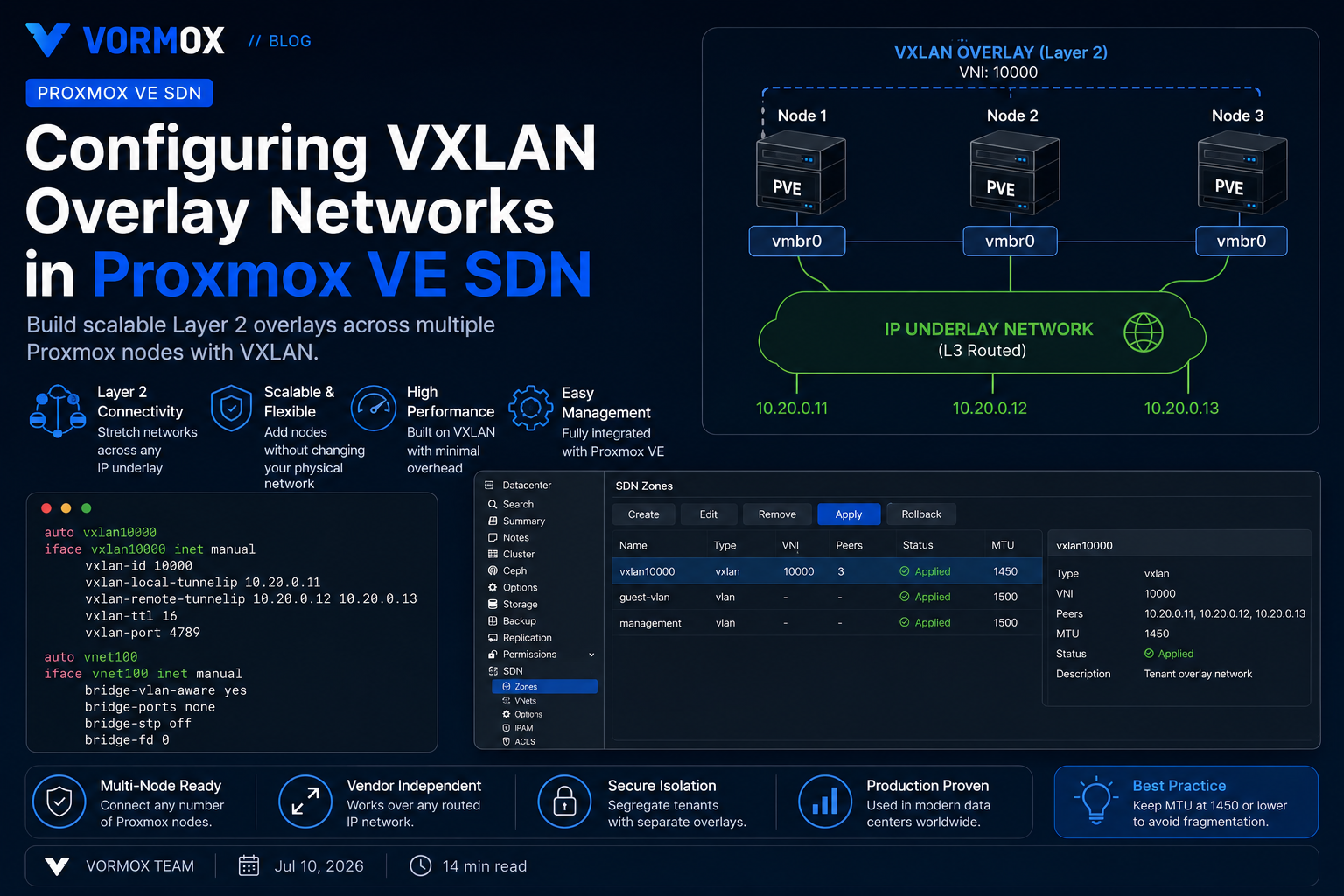
A VXLAN zone in Proxmox SDN encapsulates Ethernet frames from guest-facing VNets inside UDP datagrams (destination port 4789 by default) and forwards them between cluster nodes over an existing routed or switched underlay network, referred to as the transport network. Unlike a VLAN-aware bridge zone, a VXLAN zone does not require every physical switch in the path to understand 802.1Q tagging for the tenant network — it only needs to route or switch plain UDP/IP traffic between the node IP addresses listed as VXLAN peers.
This makes VXLAN attractive for stretched clusters, multi-rack deployments, and any environment where the physical network team cannot (or will not) provision new VLANs on demand. The tradeoff is operational complexity: VXLAN introduces an additional encapsulation layer that has its own MTU requirements, its own peer-discovery model (static peer lists in Proxmox SDN, since there is no built-in VXLAN control plane such as EVPN in a basic zone), and its own failure modes that do not show up in the normal Proxmox network configuration screens.
Administrators most often hit trouble in three places: the underlay MTU is not adjusted to account for VXLAN overhead, the VXLAN peer list is incomplete or uses the wrong interface, or the SDN configuration is edited but never applied through the SDN "Apply" action, leaving nodes running stale network state.
Symptoms
- Guests attached to a VXLAN VNet can reach other guests on the same node but not guests on remote nodes.
- Intermittent connectivity between VMs on different hosts — pings succeed with small packets but hang or drop with normal-sized traffic, including SSH sessions that stall after the initial handshake.
- The VNet's local interface (e.g.
vnet-name) is up on some nodes but missing on others after adding a new node to the cluster. journalctlon affected nodes shows repeatedifupdown2warnings about missing VXLAN peers or invalid interface references during network reload.- Traffic works immediately after
ifreload -abut breaks again after a node reboot. - ARP requests are visible in a packet capture on the VXLAN interface but never reach the remote node's bridge.
Root Cause
Almost all of these symptoms trace back to one of four root causes:
- MTU mismatch. VXLAN adds 50 bytes of overhead (8 bytes VXLAN header, 8 bytes UDP header, 20 bytes outer IPv4 header, 14 bytes outer Ethernet header, minus what's already accounted for depending on how it's measured). If the physical uplink MTU is 1500 and the VNet-facing bridge or guest interface is also left at 1500, large frames get fragmented or silently dropped by hardware that does not fragment VXLAN traffic gracefully.
- Incomplete or stale peer address lists. Proxmox VE's VXLAN zone (without EVPN) uses a statically defined list of peer IP addresses per zone. If a new node joins the cluster and its IP is not added to the peer list on every other node, that node is invisible to the overlay even though it appears healthy in the cluster.
- Configuration staged but not applied. Changes made under Datacenter → SDN in the GUI, or by editing
/etc/pve/sdn/*.cfgdirectly, are staged into a pending state. Nothing changes on the wire until an administrator clicks Apply in the SDN panel or runs the equivalent API call. Many "it's not working" tickets are simply unapplied configuration. - Firewall or routing interference on the underlay. Because VXLAN rides over standard UDP/4789, any firewall rule, security group, or cloud provider ACL that blocks UDP between node IPs will silently break the overlay while leaving the management network fully functional.
A fifth, less common cause worth ruling out on larger clusters is asymmetric routing on the transport network. If nodes reach each other through different paths in each direction — for example because of ECMP routing across multiple uplinks with inconsistent hashing, or a misconfigured static route on only one node — VXLAN encapsulated traffic can be delivered in one direction but not the other. This produces the confusing symptom of one node being able to ping a remote guest while the reverse direction times out, and it will not show up as a simple "peer unreachable" condition in any Proxmox log.
Diagnosis
Work through the underlay before the overlay. Confirm basic IP reachability between every node's SDN transport address, then confirm VXLAN encapsulation itself. Resist the temptation to start troubleshooting inside the guest OS first — most VXLAN issues are indistinguishable from a guest networking problem until you have ruled out the transport layer, and chasing guest-side DNS or firewall settings on a cluster where the overlay itself is broken wastes far more time than a five-minute underlay check.
It also helps to separate "never worked" from "worked, then broke." A zone that never passed traffic almost always points to a configuration or apply problem; a zone that worked and then stopped, especially after a node was added, rebooted, or a switch was replaced, almost always points to a peer-list or MTU regression introduced by that change. Note the timing before you start pulling packet captures, since it narrows the search considerably.
First, verify the SDN configuration is actually applied and not still pending:
pvesh get /cluster/sdnCheck that the VXLAN interface exists and is up on each node, and inspect its actual configured peers and MTU:
ip -d link show vxlan_Confirm the VNet bridge is attached to the VXLAN device and that the bridge MTU matches:
ip -d link show
brctl show
Test underlay reachability between node transport IPs with a packet size that accounts for VXLAN overhead, using the do-not-fragment flag to catch silent MTU black holes:
ping -M do -s 1450 If that ping fails but a smaller one succeeds, you have found an MTU problem on the physical path, not a Proxmox configuration problem. Next, capture traffic on the VXLAN interface itself while generating traffic from a guest to confirm frames are actually being encapsulated and sent:
tcpdump -envi vxlan_ udp port 4789Finally, check the forwarding database to see whether the local node has learned MAC addresses for guests on remote nodes:
bridge fdb show dev vxlan_An empty or stale FDB combined with visible outbound UDP traffic but no replies almost always points back to either a missing peer entry or a blocked UDP path on one of the remote nodes.
Step-by-Step Solution
1. Confirm prerequisites
SDN in Proxmox VE requires ifupdown2 to be installed and active as the network stack; the legacy ifupdown package does not support SDN's generated interfaces. Verify it on every node:
dpkg -l | grep ifupdown2If it is missing, install it and reboot the node during a maintenance window, since switching network stacks can briefly interrupt connectivity:
apt update
apt install ifupdown2
2. Plan the transport network and MTU
Identify which interface on each node carries SDN transport traffic. If your physical uplinks support jumbo frames, raise the MTU on that interface to at least 1550 (1500 + 50 bytes of VXLAN overhead, rounded up) so tenant traffic inside the overlay can still use a full 1500-byte MTU without fragmentation. If jumbo frames are not available end-to-end, plan to lower the VNet-facing MTU instead, typically to 1450, and set that MTU consistently on every guest NIC attached to the VNet.
3. Create the VXLAN zone
In the web UI, go to Datacenter → SDN → Zones → Add → VXLAN. Set a short, unique Zone ID (SDN zone names are limited to 8 characters), and populate the Peers field with the transport IP address of every node that should participate in the overlay, including the node you are configuring on.
The same zone can be created from the CLI using pvesh:
pvesh create /cluster/sdn/zones --zone vx1 --type vxlan \
  --peers 10.20.0.11,10.20.0.12,10.20.0.13 --mtu 1450
4. Create the VNet and subnet
A VNet is the tenant-facing virtual network that guests actually attach to. Create it under the new zone:
pvesh create /cluster/sdn/vnets --vnet vnet100 --zone vx1If you want Proxmox to manage IP addressing and optionally act as the gateway for guests on this VNet, add a subnet:
pvesh create /cluster/sdn/vnets/vnet100/subnets \
  --subnet 10.100.0.0/24 --type subnet --gateway 10.100.0.1
5. Apply the configuration
Staged changes must be explicitly applied before they take effect on any node:
pvesh set /cluster/sdnIn the GUI this is the Apply button at the top of the Datacenter → SDN view. Applying triggers an ifupdown2 reload (equivalent to ifreload -a) on every cluster node, so schedule this outside of business hours the first time you do it on a live cluster, since a network reload can briefly interrupt existing connections.
6. Attach guests and validate
Edit a VM or container's network device and set the Bridge field to the VNet name (e.g. vnet100) instead of a physical bridge like vmbr0. Set the guest MTU to match what you planned in step 2. Boot or hot-plug the interface, assign an address in the subnet, and test connectivity to a guest on a different node.
Commands
| Purpose | Command |
|---|---|
| List current SDN configuration | pvesh get /cluster/sdn |
| List zones | pvesh get /cluster/sdn/zones |
| List VNets | pvesh get /cluster/sdn/vnets |
| Apply pending SDN changes | pvesh set /cluster/sdn |
| Reload network stack manually | ifreload -a |
| Inspect VXLAN interface details | ip -d link show vxlan_<zone> |
| Check bridge forwarding database | bridge fdb show dev vxlan_<zone> |
| MTU-aware reachability test | ping -M do -s 1450 <peer_ip> |
| Capture VXLAN encapsulated traffic | tcpdump -envi vxlan_<zone> udp port 4789 |
| Verify ifupdown2 is active | dpkg -l | grep ifupdown2 |
Configuration Examples
The SDN stack stores its staged configuration in plain text files under /etc/pve/sdn/, replicated cluster-wide through the Proxmox cluster filesystem. A three-node VXLAN zone with one VNet and one subnet looks like this in zones.cfg:
vxlan: vx1
        peers 10.20.0.11,10.20.0.12,10.20.0.13
        mtu 1450
The corresponding entry in vnets.cfg:
vnet: vnet100
        zone vx1
        alias production-overlay
And the subnet definition in subnets.cfg:
subnet: vx1-10.100.0.0-24
        vnet vnet100
        gateway 10.100.0.1
On a guest that will use this VNet, set the network interface MTU explicitly in /etc/network/interfaces (or via cloud-init) to match the zone MTU:
auto eth0
iface eth0 inet static
        address 10.100.0.20/24
        gateway 10.100.0.1
        mtu 1450
If your uplink switches support jumbo frames end to end, raise the physical uplink MTU on every node to accommodate the encapsulation overhead without shrinking the tenant-facing MTU. On the node's physical interface configuration:
auto eno1
iface eno1 inet manual
        mtu 9000
With a 9000-byte physical MTU, the VXLAN zone and VNets can safely run at the standard 1500-byte MTU, which avoids having to configure a non-default MTU on every single guest.
Common Mistakes
- Forgetting to click Apply. Editing zones, VNets, or subnets through the GUI or API stages the change but does not push it to any node's live network configuration until Apply is run.
- Using the management IP as the transport peer when a dedicated network exists. If a cluster has a separate storage or migration network with more available bandwidth and lower latency, use that network's addresses in the peer list rather than overloading the management interface with VXLAN traffic.
- Leaving guest MTU at 1500 on a 1500-byte physical uplink. This is the single most common cause of "small packets work, large ones don't" tickets. Either raise the physical MTU or lower the VNet/guest MTU — never leave both at 1500 with VXLAN in between.
- Adding a new node to the cluster without updating the peer list. The peer list is not automatically populated from cluster membership; it must be edited manually (or via automation) every time a node is added or removed.
- Blocking UDP/4789 in host or upstream firewalls. The Proxmox firewall operates at the guest and datacenter level and does not automatically open this port on every underlay path; verify any external firewalls or security groups between nodes.
- Assuming VXLAN provides routing between VNets. A VXLAN zone provides Layer 2 connectivity within a single VNet. Routing between different VNets or out to external networks requires either a separate router/firewall VM, or an EVPN zone with a proper controller, which is a different SDN zone type.
Best Practices
- Use a dedicated, non-management network for VXLAN transport traffic wherever hardware allows it, to isolate overlay traffic from cluster corosync and API traffic.
- Standardize MTU planning before deployment rather than adjusting it reactively — decide up front whether the underlay will carry jumbo frames or whether guest MTU will be reduced, and document the choice.
- Keep the peer list synchronized with cluster membership as part of your node-onboarding runbook or automation (Ansible or a Proxmox API script), rather than relying on someone remembering to update it manually.
- Apply SDN changes during a maintenance window on production clusters, since the underlying
ifreload -acan briefly disrupt active connections on every node simultaneously. - Monitor VXLAN interface counters and the bridge FDB size over time; a rapidly growing or constantly flushing FDB can indicate a Layer 2 loop or misconfigured VNet spanning unintended traffic.
- For larger deployments needing dynamic routing between overlay segments, evaluate an EVPN zone with BGP as the control plane instead of scaling a flat VXLAN zone indefinitely — Proxmox VE 9.2 extended SDN fabric support to include BGP alongside the existing OpenFabric option, which is better suited to multi-site or highly dynamic topologies.
- Back up
/etc/pve/sdn/configuration as part of your normal cluster configuration backups; it is small text but not trivial to reconstruct from memory during an incident.
FAQ
Does a VXLAN zone require a controller like EVPN does?
No. A plain VXLAN zone uses a static peer list and floods/learns MAC addresses over the overlay, similar to traditional VXLAN flood-and-learn deployments. EVPN zones add a BGP-based control plane for MAC/IP learning and are a separate zone type with different configuration requirements.
Can I mix VLAN and VXLAN zones on the same cluster?
Yes. Zones are independent, and a cluster commonly runs a VLAN zone for traffic that needs to reach existing physical VLANs alongside a VXLAN zone for overlay-only tenant networks that don't need direct physical VLAN mapping.
What happens if a node listed as a peer is offline?
The remaining nodes continue to function normally; VXLAN simply cannot deliver traffic to the offline peer's guests until it returns. There is no cluster-quorum dependency for the VXLAN data plane itself, though the SDN configuration is still distributed through the Proxmox cluster filesystem, which does require quorum to write changes.
Why is my VNet interface missing on one node after Apply?
Check that the node's IP is actually included in the zone's peer list and that the SDN Apply step completed without errors on that specific node — check journalctl -u pve-cluster and journalctl around the time of the reload for ifupdown2 errors.
Is VXLAN traffic encrypted?
No, standard VXLAN encapsulation is not encrypted. If the transport network crosses untrusted links, use a WireGuard SDN fabric or an IPsec-protected underlay rather than relying on VXLAN itself for confidentiality.
Does live migration work across a VXLAN VNet?
Yes. Because the guest's network device is bound to the VNet rather than to a physical bridge, live migration between nodes that are both listed as VXLAN peers preserves connectivity exactly as it would on a local bridge — the guest keeps the same IP and MAC address, and traffic simply continues flowing through whichever node it now lives on.
How many nodes can realistically share one VXLAN zone?
There is no hard-coded limit in Proxmox VE itself, but a flat, statically-peered VXLAN zone relies on flood-and-learn behavior that scales less gracefully as node count and broadcast traffic grow. Clusters beyond a dozen or so heavily-utilized nodes on a single zone are usually better served by moving to an EVPN zone with BGP, which replaces flooding with proper MAC/IP route distribution.
Conclusion
VXLAN zones in Proxmox VE SDN solve a real operational problem: extending Layer 2 tenant networks across nodes without depending on physical switch VLAN configuration for every workload. The technology is reliable once the underlay is sized correctly for the encapsulation overhead and the peer list is kept in sync with cluster membership, but both of those requirements are easy to overlook during initial rollout and easy to forget during routine node maintenance. Treat MTU planning and peer-list management as part of your standard cluster documentation, apply SDN changes deliberately during maintenance windows, and validate with packet captures rather than assumptions when something doesn't come up cleanly. Done this way, VXLAN becomes a dependable building block for multi-node and multi-site Proxmox VE networking rather than a recurring source of hard-to-diagnose connectivity tickets.