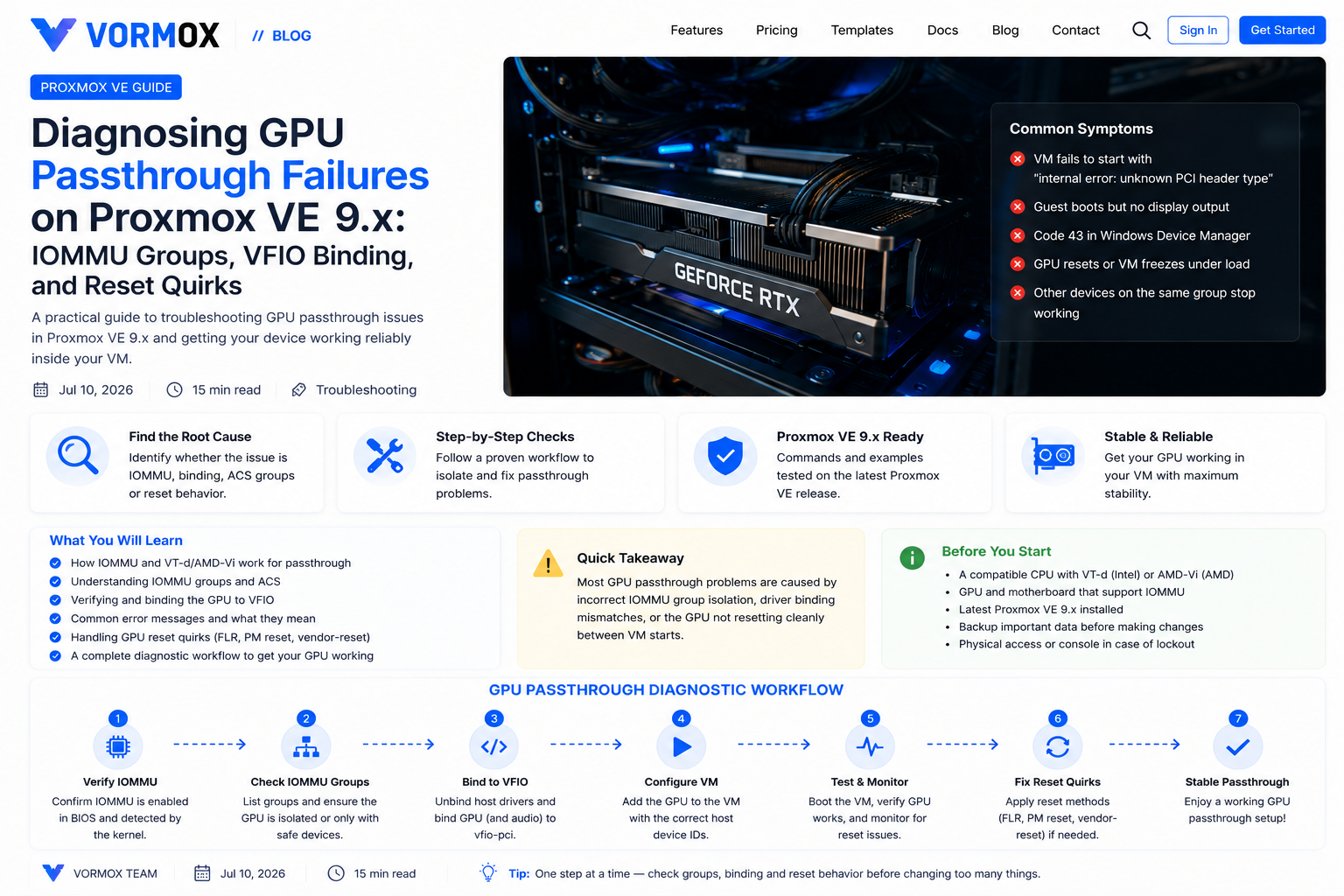
GPU passthrough on Proxmox VE is one of those features that looks trivial in a blog post and then eats an entire Saturday when your specific board, your specific card, or your specific BIOS revision doesn't cooperate. The mechanism itself — IOMMU isolation plus VFIO binding — hasn't changed much in years, but the failure modes have multiplied as newer GPUs, newer kernels, and newer motherboard firmware interact in ways the original workflow never anticipated. This piece walks through what actually goes wrong on Proxmox VE 9.x hosts (kernel 6.14 and the newer 6.17/7.0 branches), how to read the errors instead of guessing at them, and how to fix the underlying cause rather than papering over it with kernel flags you don't fully understand.
If you've already passed a GPU through successfully on an older Proxmox install and it broke after an upgrade, or you're setting this up for the first time on a Ryzen or 12th-gen-and-later Intel box, most of what follows applies directly to you.
Problem Overview
GPU passthrough hands a physical PCIe device — the GPU and usually its companion audio function — directly to a VM, bypassing the host's own driver stack entirely. The VM gets near-native performance because QEMU isn't emulating a display adapter; it's exposing real silicon through VFIO (Virtual Function I/O). For this to work safely, the host has to prove the device can be electrically and functionally isolated from the rest of the system. That proof comes from the IOMMU (Intel VT-d or AMD-Vi) grouping devices so that DMA from one device can't reach memory belonging to another.
When everything lines up — IOMMU enabled in firmware and kernel, GPU in a clean isolation group, correct driver bound before boot, and a VM config that matches the hardware topology — passthrough is nearly invisible. The VM boots, the GPU shows up in Device Manager or lspci inside the guest, and you get full performance. When any one of those pieces is off, you get a VM that hangs at boot, a black screen on the passed-through display, or a host that locks up entirely when you start the VM.
The gap between "should work" and "does work" is almost always one of: the kernel driver claimed the card before vfio-pci could, the IOMMU group contains devices you didn't intend to pass through, or the GPU simply doesn't reset cleanly between VM stop and start.
Symptoms
The failure signatures are fairly consistent once you've seen them a few times:
- VM start fails immediately with an error referencing
vfio-pcior a specific PCI address, oftenprobe of 0000:01:00.0 failed with error -16(device busy). - The VM boots but the guest OS shows a generic display adapter or "Code 43" in Windows Device Manager for an NVIDIA card.
- The first VM start after a host reboot works fine; the second start (VM stop, then start again) hangs or the host logs
vfio-pci: Unable to power on device, stuck in D3. - Starting the VM freezes the entire Proxmox host, requiring a hard reset — no SSH, no console, nothing in the syslog after a certain point.
- The GPU never leaves the host's own driver (nouveau, amdgpu, or nvidia) despite blacklisting, and
lspci -nnkstill shows the host driver as active. - Passthrough works for one boot cycle and then silently stops working after a Proxmox kernel update, with no config changes on your end.
None of these are random. Each one maps to a specific, diagnosable cause, which is the part most guides skip past on their way to "just add this line to grub."
Root Cause
Four root causes account for the overwhelming majority of passthrough failures I've run into.
The host driver grabs the GPU before vfio-pci can
Linux starts loading kernel modules and framebuffer drivers extremely early in boot — often before Proxmox's own module-loading order takes effect. If nouveau, amdgpu, or the proprietary nvidia driver initializes the card first, vfio-pci can't bind to it, and you get the "device busy" probe failure. This is the single most common cause of a broken first attempt.
Incomplete IOMMU group isolation
Your GPU doesn't exist in isolation on the PCIe bus. It's usually grouped with its own HDMI/DP audio controller, and depending on the motherboard, sometimes with USB controllers, other PCIe slots, or chipset bridges that share the same upstream port. If the IOMMU group contains a device you're not passing through, Proxmox won't let you pass the GPU through cleanly — or it will, and you'll get intermittent host instability because DMA isolation isn't actually guaranteed for that group.
GPUs that don't implement a clean FLR (Function Level Reset)
Consumer GPUs, unlike server-grade cards with SR-IOV or vendor-certified passthrough support, were never designed to be handed back and forth between a host and multiple VM sessions. Many of them — a lot of older NVIDIA consumer cards, and some AMD cards depending on firmware — don't reset properly when a VM shuts down. The result is a card that works the first time vfio-pci binds it post-boot, and hangs or errors on every subsequent VM start until you reboot the host.
Firmware-level Unity Map / identity-domain restrictions on newer GPUs
This one is newer and catches people by surprise. On some AMD platforms and newer NVIDIA cards, the motherboard's ACPI IVRS table declares a Unity Map (IOMMU_RESV_DIRECT) reservation for the GPU, which forces the IOMMU into an identity domain for that device. Kernels in the 6.10+ range enforce this more strictly than older kernels did, and VFIO's translated domain request gets rejected outright — you'll see the VM fail to start with an IOMMU-related error even though everything else in your config is correct. The fix here is almost always in firmware, not in Proxmox: look for "Above 4G Decoding," "Resizable BAR," or IOMMU-related toggles in the motherboard's UEFI and disable the ones tied to unity mapping, then reboot and retest.
Diagnosis
Work through this in order — don't skip to the VM config until the host-side pieces are confirmed.
First, confirm the IOMMU is actually enabled and active, not just requested in your boot parameters:
dmesg | grep -e DMAR -e IOMMUOn Intel you want to see something like DMAR: IOMMU enabled. On AMD, look for AMD-Vi: IOMMU performance counters supported or similar. If you see nothing, the kernel parameter didn't take — check your bootloader config before going any further.
Next, enumerate the IOMMU groups and see what's sharing a group with your GPU:
for d in /sys/kernel/iommu_groups/*/devices/*; do
  n=${d#*/iommu_groups/*}; n=${n%%/*}
  printf 'IOMMU Group %s: ' "$n"
  lspci -nns "${d##*/}"
done
If your GPU's group contains anything other than its own audio function, that's your isolation problem. On desktop boards this is common with USB controllers or secondary M.2 slots sharing a PCIe root port with the GPU slot — sometimes the fix is as simple as moving the card to a different physical slot.
Then check which driver currently owns the card:
lspci -nnk -d 10de:*(swap 10de for 1002 on AMD, or drop the -d filter and just look for your card in the full output). The line you care about is Kernel driver in use: — if it says nouveau, amdgpu, or nvidia instead of vfio-pci, the host claimed it before your vfio config took effect.
Finally, if the VM start itself is failing, get the real error instead of guessing from the GUI's generic "TASK ERROR":
qm start 100
journalctl -u pvedaemon -n 100 --no-pager
and check dmesg -T immediately after the failed start — kernel-level VFIO errors show up there, not in the Proxmox task log.
Step-by-Step Solution
-
Enable IOMMU in the bootloader. Edit
/etc/kernel/cmdline(if you're on the default systemd-boot/proxmox-boot-tool setup) or/etc/default/grubif you're on legacy GRUB. For Intel:intel_iommu=on iommu=ptFor AMD:
amd_iommu=on iommu=ptThen apply it. If you're using
proxmox-boot-tool:proxmox-boot-tool refreshor, on legacy GRUB installs:
update-grub -
Load the VFIO modules at boot. Add these to
/etc/modules:vfio vfio_iommu_type1 vfio_pci vfio_virqfd -
Bind the GPU to vfio-pci before the host driver can claim it. Find your GPU's vendor:device IDs with
lspci -nn, then create/etc/modprobe.d/vfio.conf:options vfio-pci ids=10de:2504,10de:228e(the second ID here is typically the card's HDMI audio function — include both).
-
Blacklist the host driver so it never gets a chance to attach. In
/etc/modprobe.d/blacklist.conf:blacklist nouveau blacklist nvidia blacklist radeon blacklist amdgpuOnly blacklist the drivers relevant to the card you're passing through — don't blindly blacklist amdgpu if you're keeping an AMD iGPU for the host console.
-
Rebuild the initramfs so early boot picks up the new binding order.
update-initramfs -u -k allReboot the host after this step. This is not optional — module load order is baked into the initramfs image, and a running system won't reflect changes to
/etc/modulesor/etc/modprobe.d/until it's rebuilt and the box comes back up. -
Verify the binding took effect using the
lspci -nnkcheck from the Diagnosis section above. If the driver in use still isn'tvfio-pci, stop here and re-check steps 1–5 before touching the VM config — a broken host-side binding will never work no matter what you change in the VM. -
Configure the VM. Use the
hostpcidirective, either through the GUI's Hardware tab (Add > PCI Device) or directly:qm set 100 --hostpci0 01:00,pcie=1,x-vga=1Make sure the VM is on the
q35machine type with OVMF (UEFI) firmware if you're passing through a modern GPU — the olderi440fxmachine type and SeaBIOS have spottier PCIe passthrough support and will cause otherwise-correct configs to fail. -
For NVIDIA cards in Windows guests, hide the hypervisor from the driver. NVIDIA's consumer driver refuses to initialize (Code 43) if it detects it's running under a hypervisor it doesn't recognize. Add this to the VM config:
args: -cpu host,kvm=offor, more precisely, via the GUI-manageable
cpuline with hidden state — theargsoverride above is the most reliable path if you're hand-editing.
Commands
The commands you'll come back to repeatedly while troubleshooting, in the order you'd typically run them:
# Confirm IOMMU is active
dmesg | grep -e DMAR -e IOMMU

# List PCI devices with vendor:device IDs
lspci -nn

# Check current driver binding for a device
lspci -nnk -s 01:00.0

# Enumerate IOMMU groups
find /sys/kernel/iommu_groups/ -maxdepth 1 -type d

# Rebuild initramfs after modprobe.d changes
update-initramfs -u -k all

# Refresh bootloader config (systemd-boot / proxmox-boot-tool setups)
proxmox-boot-tool refresh

# Start a VM and immediately check kernel log for VFIO errors
qm start 100 && dmesg -T | tail -n 50

# Check what's currently attached to a VM
qm config 100

# Detach a PCI device from a VM (useful when reassigning)
qm set 100 --delete hostpci0

# Manually rebind a device to vfio-pci without rebooting (temporary, for testing)
echo 0000:01:00.0 > /sys/bus/pci/devices/0000:01:00.0/driver/unbind
echo vfio-pci > /sys/bus/pci/devices/0000:01:00.0/driver_override
echo 0000:01:00.0 > /sys/bus/pci/drivers/vfio-pci/bind
That last block is genuinely useful for iterating quickly during diagnosis, but treat it as a debugging tool, not a permanent fix — put the real binding logic in /etc/modprobe.d/vfio.conf once you know it works, so it survives reboots.
Configuration Examples
A working /etc/modprobe.d/vfio.conf for a single NVIDIA card with its audio function:
options vfio-pci ids=10de:2504,10de:228e disable_vga=1A minimal but complete VM config snippet for a Windows guest with a passed-through GPU, stored at /etc/pve/qemu-server/100.conf:
machine: q35
bios: ovmf
efidisk0: local-lvm:vm-100-disk-1,efitype=4m,pre-enrolled-keys=1,size=4M
cpu: host
hostpci0: 01:00,pcie=1,x-vga=1
vga: none
args: -cpu host,kvm=off
scsihw: virtio-scsi-pci
boot: order=scsi0
Note the vga: none line — with the GPU passed through as the primary display, you don't want Proxmox's virtual display adapter fighting for VGA arbitration. Connect to the VM console via RDP or the physical outputs on the passed-through card once Windows is installed, not the Proxmox noVNC console.
If the GPU sits in an IOMMU group with unrelated devices and moving it to a different slot isn't possible, the ACS override patch is the usual workaround — but it's a real tradeoff, not a free fix:
pcie_acs_override=downstream,multifunctionadded to the same kernel command line as your iommu=pt flag. This forces the kernel to treat downstream devices as isolated even when the hardware doesn't strictly guarantee it. I wouldn't run this on anything where you actually care about the isolation boundary between host and VM — it's fine for a homelab where the "attacker" is your own VM misbehaving, not acceptable for a multi-tenant environment.
Common Mistakes
| Mistake | Why it breaks passthrough |
|---|---|
Skipping update-initramfs -u -k all after editing modprobe.d files | Module blacklists and vfio-pci bindings are baked into the initramfs; edits to /etc/modprobe.d/ don't take effect until it's rebuilt and the host reboots. |
| Using the GPU as the host's boot/console display | The framebuffer driver attaches to the card during early boot before vfio-pci gets a chance, guaranteeing a busy-device error. |
| Assuming one working boot cycle means the config is correct | Cards with poor FLR support will pass through fine once and then hang or error on the second VM start — test stop/start cycles, not just the first boot. |
| Passing through a GPU whose IOMMU group includes unrelated hardware | Proxmox either blocks it or you end up with a group that isn't actually isolated, risking host instability under load. |
| Leaving the VM on i440fx/SeaBIOS for a modern GPU | PCIe passthrough is far more reliable under q35 + OVMF; legacy machine types were designed before PCIe passthrough was a common use case. |
| Forgetting the audio function's device ID in vfio.conf | The GPU binds to vfio-pci but the HDMI/DP audio device stays with the host driver, causing partial or inconsistent passthrough behavior. |
Best Practices
Dedicate a cheap secondary GPU, or your motherboard's integrated graphics, to the Proxmox host console. This sidesteps the entire "framebuffer claims the card first" problem and lets you debug the host over local console even when the passed-through GPU is bound to vfio-pci and unavailable to the OS.
Pin the VM's CPU cores and isolate them from the host scheduler if you're running anything latency-sensitive in the guest — gaming VMs and GPU compute workloads both benefit from isolcpus or cgroup-based pinning, since GPU passthrough alone doesn't guarantee consistent CPU scheduling.
Snapshot the working /etc/modprobe.d/, /etc/kernel/cmdline (or grub config), and the VM's .conf file somewhere outside the VM itself before a Proxmox major version upgrade. Kernel version bumps are the most common trigger for previously-working passthrough setups breaking, and having the known-good config to diff against saves a lot of guesswork.
Test the actual failure mode you care about — a VM that boots once isn't the same as a VM that survives a reboot cycle inside the guest. If your use case involves the guest OS restarting itself (Windows updates, for instance), verify that specific scenario before calling the setup done.
Avoid the ACS override patch unless you've confirmed there's no way to physically relocate the card to a cleanly isolated slot. It's a workaround for a hardware isolation gap, not a substitute for actual isolation, and it's worth understanding that distinction before you rely on it.
FAQ
Does GPU passthrough work the same way on Proxmox VE 8.x and 9.x?
The mechanism is identical — IOMMU, vfio-pci, hostpci directives. What changes between kernel versions is how strictly newer kernels enforce IOMMU domain assignment, which is why some configs that worked on PVE 8's 6.8 kernel need firmware tweaks (disabling Resizable BAR or Above 4G Decoding) to keep working on PVE 9's 6.14+ kernels.
Can I pass through my only GPU and still use the Proxmox host normally?
You can, but you lose local console output on that card once it's bound to vfio-pci — you'll be managing the host entirely over SSH and the web UI. Most people find this workable, but it makes early-boot troubleshooting much harder if something else goes wrong.
Why does passthrough work after a fresh reboot but fail on the second VM start?
This is almost always a GPU that doesn't implement a clean function-level reset. The card comes up fine when vfio-pci binds it fresh at boot, but doesn't reset properly when the VM stops, leaving it in a bad state for the next start.
Do I need SR-IOV support for this to work?
No — SR-IOV lets one physical device present as multiple virtual devices to different VMs simultaneously, which is a separate capability mostly limited to datacenter-class GPUs and NICs. Standard GPU passthrough hands the entire physical device to one VM at a time and works on consumer hardware.
Is the ACS override patch safe to use?
It's safe in the sense that it won't corrupt data, but it weakens the isolation guarantee the IOMMU group is supposed to provide. Fine for a homelab; I'd think twice before using it anywhere the VM isn't fully trusted.
Conclusion
Most GPU passthrough failures on Proxmox VE trace back to timing and isolation, not exotic misconfiguration — the host driver winning a race against vfio-pci, an IOMMU group that isn't as clean as you assumed, or a card that simply doesn't reset the way the workflow expects. Work through the diagnosis steps in order, confirm each layer before moving to the next, and resist the urge to add kernel flags you found in a forum thread without understanding what they actually change. Once the binding is solid and the VM config matches your hardware topology, passthrough on Proxmox is remarkably stable — the effort is entirely front-loaded into getting it right the first time.